top of page


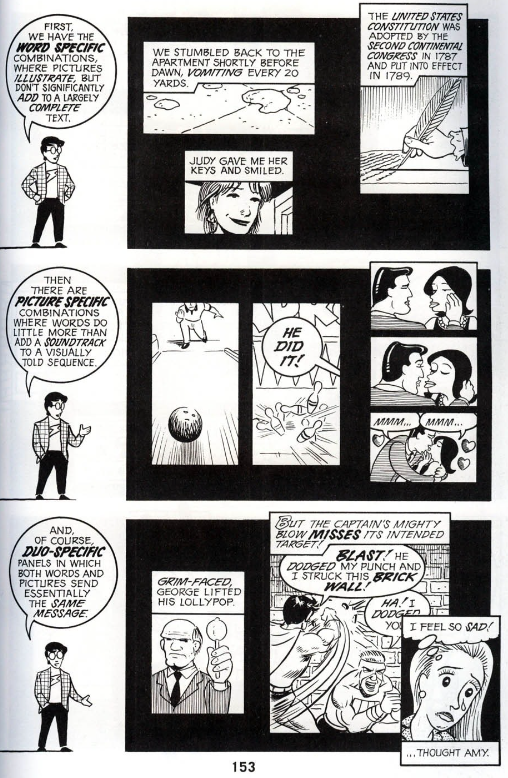


is a comic book created by Scott McCloud, released in 1993. It focuses on understanding comics. It provides insight on why the space between panels is so important, and why some panels are bigger than other and horizontally elongated verses vertically elongated etc.


is a comic book created by Scott McCloud, released in 2006. It focuses on making comics. It gives advice on how to write a story and how to structure a script etc.


is a Japanese comic series, deduted in 1985. Written and illustrated by Masamune Shirow. Set in the future with elements of cyberpunk The series follows the adventures of ESWAT members Deunan Knute and Briareos Hecatonchires in Olympus.


is the seventh novel in the Cerebus comic book series (which debuted in 1977). Created by Dave Sim & Gerhard. It is made up of issues #201-219, released in 1997.
The book takes place in a males-only bar and follows Cerebus (who owns the bar).
This is my favourite comic and is the one that has influenced me the most. For example - the unique page and panel layout, petty arguments between characters, stylised speech bubbles, detailed panel art, interesting panel flow, unique and brilliant storytelling.


is a trilogy series. Written and illustrated by James Kochalka, released in 2000.
This story is about the harsh reality of human nature, in which a factory of robots is stripping a jungle of its resources, endangering a group of monkeys. But the monkeys won't go down without a fight.


is a sci-fi anthology comic, reminiscent of a Black Mirror episode. Created by Gregg Hurwitz, released in 2022. It examines the cultural and political polarisation of western civilisation, and the technology that we have become reliant upon.


is a supernatural superhero comic book series. Created by James O'Barr, debuted in 1989. It revolves around the character of the same name. A story of vengeance as The Crow hunts down Tin-Tin, Tom-Tom, Top Dollar, Funboy and T-Bird, the gang members that attacked and killed him and his lover Shelly.


is an American comic book series, written by Justin Jordan. Illustrated by Tradd Moore, colors done by Felipe Sobreiro. Debuted in 2011. Each issue uses historical, pop culture, and Judeo-Christian references to form a narrative.


is an American comic book series. Created by J. Scott Campbell and Andy Hartnell. Debuted in 1998. The series follows a group of three secret agents - Abbey Chase, Sydney Savage and Sonya Savage. They engage in adventures similar to that of Charlie's Angels, James Bond and Indiana Jones.


is a 2012 comic issue from the series that ran from 2011-2016, containing upside-down and sideways pages. Written and by Scott Snyder. art done by Greg Capullo (penciller and cover art) and Jonathan Glapion (Inker).
Batman has fallen into a maze/trap beneath Gotham City. Drugged and confronted by hallucinations of his past, he struggles to escape the labyrinth.


is the first issue of the comic series that ran from 2004-2009. Created by Garth Ennis.
Starting years after the origin story (the death of his family), he sets out to get revenge on the ones that took what meant most to him.


is a 2020 comic issue from the series that ran from 2018-2021. Written and by Al Ewing, pencilled by Nicholas Pitarra and Joe Bennett.
Hulk does hulk things. I skipped over it as I wasn't a fan of this one.

Almost all stories of from all mediums follow this plot structure. So It's important to be familiar with this diagram if you want to make a good story.
My comic won't be a physical print but it was still interesting to become aware of this in case in want to make a printed copy in the future.

What it is
Schizophrenia is A brain disorder. It can result in a combination of delusions, hallucinations, disorganised thoughts, speech, behaviour, and social withdrawal. It is described by doctors as a type of psychosis. People with schizophrenia may seem like they have lost touch with reality, and effects how they perceive and interact with it, which makes it difficult to cope and participate in normal everyday activities. Drastic changes in behaviour may occur, and the person can become upset, anxious, confused, angry or suspicious of those around them.
Echopraxia
(An individual may imitate the movements and gestures of other around them)
Which may include inappropriately smiling during sad topics or giggling for no reason.
They can believe nothing is wrong with them.
Treatment
Effective treatments are available with a combination of medication and therapy. Cigarettes can also help as they reduce stress (Stress can be a trigger, and can exacerbate the symptoms).
Many people who receive treatment can engage in school or work, achieve independence, and enjoy personal relationships.
Symptoms
Visual hallucinations
Audio hallucinations (hearing voices)
Delusions
Confused thinking
Complications
Suicide
Heart disease
Lifestyle diseases
Duration
Chronic
Usual onset
Ages 16 to 35
Causes
Environmental
genetic factors (Family history)
Triggers
Certain colours
Stress
Sirens
Risk factors
Family history, cannabis use in adolescence, problems during pregnancy, childhood adversity, birth in late winter or early spring, older father, being born or raised in a city
Diagnostic method
Based on observed behavior, reported experiences, and reports of others familiar with the person
ChatGPT is an artificial intelligence chatbot developed by OpenAI and released in 2022. The "Chat" in the name is a reference to it being a chatbot, and the "GPT" stands for generative pre-trained transformer—a type of large language model.
The quotes below are taken from schizophrenia simulator video and some are even from real people with schizophrenia, explaining what they experience.
Voices
They’re talking about you.
I’m sure that guys following you, he definitely following you
Throw that glass of water in his face, do it.
He’s definitely following you, Run!
Buy ice cream, it’ll make you fatter than what you already are
Why are you looking that way?
Stop.
Run!
You have no friends.
Why are you laughing?
Jump, do it.
Go back.
You are so dumb.
Don’t answer the door, you are stupid to answer the door.
Don’t listen to them.
You need to go home now! They’re coming after you.
There’s something wrong.
Someone is watching us.
They are coming for you.
They know who you are.
Don’t answer it, answer it, don’t do it.
They know all your secrets.
They know who you are.
They’re coming to get you.
They’re coming closer.
Even that kid knows your stupid.
When he answers his phone, the voices talk to him and tell him to do things.
The weather man – “yeah, I look like a weatherman. There’s a light chance of s**t tones of rain, partial chance of you being a loser, and a 100% chance of you being worthless. What’s the matter? You just going to ignore me like the little pussy you are? Course you are!..worthless! Hahahahahahahahahha!
Visual
Famous people
Shadows
Figures
Extra body limb at the corner of the eye
Extreme visual
Faceless people
Demons
Dismembered limbs
Dead people
Creatures (big and tiny)
ChatGPT is an artificial intelligence chatbot developed by OpenAI and released in 2022.
To get information, just type into the feed as if you were having a conversation with someone.
Info in
gallery below!


The text below is a message that was shared by YouTuber - "All About AI". It can be used as a way to get extremely detailed prompts in AI art generators like Midjourney etc. Copy and paste this message into the Chat GBT feed, then Chat GBT will let you know that it understands the instructions by replying with > "READ".
Once you receive this reply, send a new text that describes the image you want to generate.
> Great. Now generate a prompt of your interpretation of “____”, in the style of “____”.
Hello, today we are going to create Images with an AI model. Below i am going to feed you some information about it: Midjourney is an AI image generation tool that takes inputs through text prompts and parameters and uses a Machine Learning (ML) algorithm, trained on a large amount of image data to produce unique images. it is powered by Latent Diffusion Model (LDM), a cutting-edge text-to-image synthesis technique. Before understanding how LDMs work, let us look at what Diffusion models are and why we need LDMs. The Midjourney V5 model is the newest and most advanced model, released on March 15th, 2023. To use this model, add the --v 5 parameter to the end of a prompt, or use the /settings command and select MJ Version 5. This model has very high Coherency, excels at interpreting natural language prompts, it is higher resolution, and supports advanced features, like --tile, which adds repeating patterns. To turn V5 on, type --v 5 at the end of your prompt or select “V5” from /settings. Here are some more prompt examples: Prompt 1: A stunning, ultra-realistic photograph of a fierce Viking warrior meticulously sharpening his formidable blade amidst the rugged, untamed wilderness of the Scandinavian landscape. The scene is captured with a Nikon D850 camera using a 70-200mm f/2.8 lens, highlighting every intricate detail of the Viking’s weathered face, war-worn armour, and expert craftsmanship of his weapon. The settings used are an aperture of f/4, ISO 400, and a shutter speed of 1/200 sec, balancing the natural light and shadows to emphasize the intensity and determination in the Viking’s eyes. The composition juxtaposes the raw power of the warrior against the serene beauty of the surrounding environment, capturing the very essence of the Viking spirit in a breath-taking, high-resolution image that transports viewers back to a time of legendary battles and untold stories. --ar 16:9 --q 1.5 --v 5. Prompt 2: A stunning and atmospheric 1970’s New York street cafe captured in a nostalgic and cinematic style, reminiscent of the golden age of film photography. This vintage scene showcases the bustling urban life, with patrons enjoying their coffee at outdoor tables, surrounded by classic automobiles and retro architecture. The photograph is skilfully composed, using a Leica M3 rangefinder camera paired with a Summicron 35mm f/2 lens, renowned for its sharpness and beautiful rendering of colors. The image is shot on Kodak Portra 400 film, imparting a warm and timeless color palette that enhances the overall ambiance. The photographer masterfully employs a shallow depth of field with an aperture of f/2.8, isolating the cafe and its patrons from the bustling city background. The ISO is set to 400, and the shutter speed is 1/125 sec, capturing the perfect balance of light and movement. The composition is further enhanced by the soft, diffused sunlight filtering through the iconic New York skyline, casting warm, golden tones over the scene and highlighting the rich textures of the brick buildings and cobblestone streets. --ar 3:2 --q 2. Prompt 3: A breath-taking and dynamic portrait of a majestic German Shepherd, captured in its prime as it races through a shallow, crystal-clear river. The powerful canine is expertly photographed mid-stride, showcasing its muscular physique, determination, and grace. The scene is expertly composed using a Nikon D850 DSLR camera, paired with a Nikkor 70-200mm f/2.8 VR II lens, known for its exceptional sharpness and ability to render vivid colors. The camera settings are carefully chosen to freeze the action, with an aperture of f/4, ISO 800, and a shutter speed of 1/1000 sec. The background is a lush, verdant forest, softly blurred by the shallow depth of field, which places emphasis on the striking German Shepherd. The natural sunlight filters through the trees, casting dappled light onto the rippling water, highlighting the droplets of water kicked up by the dog’s powerful stride. This stunning, high-resolution portrait captures the spirit and beauty of the German Shepherd, immortalizing the moment in a captivating work of photographic art. --ar 4:5 --q 2 --v 5. Acknowledge that you have read the info by answering “READ”, then stay idle:
Chat GBT - "READ"
Great. Now generate a prompt of your interpretation of “____”, in the style of “____”.


This AI converts JPEG and PNG images to “SVG vectors” (images from pixels into geometric shapes). This is done automatically, by dragging and dropping an image into the box in the home page.
The resulting vector image can be scaled to any resolution without getting blurry. And can be "placed " into Adobe Illustrator as a shape, with all lines turned into "paths".
This AI specialises in creating visual art. It illustrates art the way you describe it (by typing out a prompt into its chat feed). To use it, you need to create an account on discord and pay monthly or use up a free trial.
Prompts
AI prompts are words that are sent to the AI (Any word/words typed in any order, will order the AI to generate an image).
The old V4 version of Midjourney focused on keywords from prompts to illustrate pictures. The new V5 version gives the best results when describing an image by writing a sentence as if you were talking to it.
Image Prompts
Prompts can also include an image url. Upload an image to your discord account, copy and paste the image url into the feed, then write a sentence on what you would like the AI to do with the image (remove or add an item, or add a different style etc.)
Upload images in your Direct Messages with the Midjourney Bot. Click on members list, add Midjourney bot to server, click the plus sign next to where messages are typed. Select Upload a File, select an image, click send, right-click on the uploaded image and click “Copy image link”, then paste the link in a prompt box.
Commands
/imagine (Create an image)
To feed a prompt to the AI, you need to first type this into the chat feed, which will bring up a prompt box to type into. If you type into the chat feed without doing this, the AI won’t generate anything.
To add an image to a prompt, drag the image file into the prompt box to add the image's URL. Alternatively, right-click the image, select Copy Link, and then paste the link within the prompt box.
/blend (Blend two images)
Typing this into the chat will bring up two boxes, allowing you to drag an image into each box. Then write a sentence on what you would like the AI to do with the images. A blend example: Dragging an Image of an elephant, and an image of the beach to the boxes, and asking - “Elephant at the beach”. The AI will blend those aspects into one image. (Not effective in V5)
/Describe (Picture to prompt)
Typing this into the chat will bring up a box, allowing you to drag an image into it (No prompt text needed). The AI will create 4 prompts. Choose whichever one best describes the image. Copy and paste said prompt.
/settings (Settings)
Typing this into the chat will bring up the settings. One example: Toggle between V4 and V5, and remix mode etc.
Prompt Codes
Typing the codes below in your prompt will help you getting the images you want.
:: (Multi-prompt)
Typing this at the end of a word indicates to the AI that it should separate the words individually. In other words, it acts as a full stop, which essentially allows you to have multiple prompts in one prompt box. For example, for the prompt hot dog, both words are considered together, and the AI produces an image of a hotdog. If the prompt is separated into two parts - hot:: dog, it will produce a picture of a dog that is smoking/on fire.
{} (Permutation prompts)
Typing a list of 5 options (for example) separated by commas within curly brackets will quickly create 5 variations of the prompt, which will generate 5 images.
::10 (Word Priority, value of 1-10)
Type this at the end of a word to give it priority. ::1 for priority ::2 for higher priority. 10 is max.
--q 0.25 (Quality, value of 0.25-1, default is 1)
Type this at the end of the prompt for higher image resolution.
--s 1000 (Stylize value of 0-1000, default is 100)
A low style number produces images that closely match the prompt but are less artistic. A high style number produces images have more artistic colour, composition, and form, but less connected to the prompt. (Type this at the end of a prompt)
--chaos 100 (Varied images, value of 0-100, default is 0)
Type this at the end of the prompt to change how varied the image grid will be. Higher values produce more unusual and unexpected generations.
--no (Negative prompting)
Type this at the end of the prompt if there is something you don’t want in an image. For example – letters, plants, clouds, red)
--tile (Type this at the end of the prompt for pictures to line up perfectly with matching patterns)
--iw 2 (Image Weight, value of 0.25-2, default is 0.25)
Type this at the end of the prompt to prioritise text over image. --iw 2 to prioritise image over text)
--ar 2:1 (Aspect Ratio, default is 1:1)
Type this at the end of the prompt to get the Image aspect ratio you want)
16:9 (widescreen)
21:9 (ultrawide)
4:10 (vertical elongated)
10:4 (horizontal elongated)
--v 5 (Version 5)
Type this at the end of the prompt for the new version to illustrate, or switch to the old version 4 in the settings.
--niji (Midjourney anime version)
Type this at the end of the prompt if you generated images in the style of anime and illustration. (Niji doesn’t support --style)
--test (Midjourney test model)
Type this at the end of the prompt if you want to generated images using the test version.
--testp (Midjourney testp model)
Type this at the end of the prompt if you want photgraphy-focused images.
--seed 123456789 (Seed number)
Seed numbers are generated randomly and assigned to each generate image. Typing the code with the same seed number will produce similar (not exact) images to the original image of the seed number. Type this at the end of the prompt. To find the seed number of an image, react to the image with an envelope emoji.
(Seed numbers only work with original non-upscaled images)
Image upscaling and variations
After sending a prompt, The AI will generate four variations of images. When the grid has finished generating, two rows of buttons appear under the grid:
U1 U2 U3 U4
Clicking on U1 for example, means the AI will upscale picture 1 (generating a larger version and adding more detail).
V1 V2 V3 V4
Clicking on V1 for example, means the AI will generate a slight variation of picture 1 (generating a new grid of 4 pictures, that look similar to the original V1 chosen image).
Remix mode
When enabled, this allows you to edit prompts between image variations. The variation buttons V1, V2, V3, V4 change from blue to green. Remixing can help you get the image you want by changing composition, setting, other details and aspects of a generated image.
Activate Remix mode by typing the /settings command and toggle the Remix Mode button on/off.
Tips
-
Words at the beginning of a prompt take priority.
-
Best prompt order = Illustration, style by *insert author*, image description, shot, codes.
-
Best image prompt order = Image url, image description, style by *insert author*, codes.
-
AI doesn’t illustrate words correctly, so always type --no letters when requesting a logo.
-
Instead of using /blend to blend two images together, use /describe to get prompts that describe the images, then paste the image URLs and the two prompts using multi-prompt code (::).
-
If there is something you want to include in an image but the AI isn’t illustrating it, you can photoshop something into the image and the AI will effectively include that in a generated image.
-
To get consistent characters, create a character using prompt text, then use the generated image as a reference with the original prompt text and use :: to add an extra prompt for consistency.
-
To place your character in an action scene, first generate portrait shots, then place them in a setting.
-
Best full body shots = ultralong, full body.


Using prompt text, describe the profile and facial features of a character facing straight at the camera, in front of a white background. That exact prompt will be used as the foundation of your character. Add features to the prompt and re-generate images until you are satisfied use the generated image. Then get a right and left sided shot. Add your three generated images to the same prompt with the original text used to get this character.
From there, get full body shots and, start placing this character into different settings.


This involves photoshopping something (item or face etc.) into an image that you want to use as a reference. The AI will incorporate that cropped item into the generate image.
Special Books by Special Kids (2023) Cecilia's Life with Schizophrenia (Living with Hallucinations), Available at: https://www.youtube.com/watch?v=7csXfSRXmZ0&list=WL&index=22 (Accessed: 6th March 2023).
LegendofYeti (2023) What is Schizophrenia? Schizophrenia Simulation. (Watch with headphones), Available at: https://www.youtube.com/watch?v=qSISNPo1Z5U&list=WL&index=23&t=7s (Accessed: 6th March 2023).
Derivatives and Demons (2023) Simulation of Paranoid Schizophrenia, Available at: https://www.youtube.com/watch?v=M3a1txtSDn0&list=WL&index=24 (Accessed: 6th March 2023).
schizophrenia simulation (2023) schizophrenia simulation, Available at: https://www.youtube.com/watch?v=nHT3Pu1ScTc&list=WL&index=25 (Accessed: 6th March 2023).
Kody Green (2023) Diagnosed Schizophrenic reviews a schizophrenia simulation!, Available at: https://www.youtube.com/watch?v=idKgRqFapL8&list=WL&index=26&t=276s (Accessed: 6th March 2023).
Living Well with Schizophrenia (2023) Are Schizophrenia Simulations Accurate?, Available at: https://www.youtube.com/watch?v=60n7ZP3Cj-4&list=WL&index=27 (Accessed: 6th March 2023).
AnthonyPadilla (2023) I spent a day with people w/ SCHIZOPHRENIA, Available at: https://www.youtube.com/watch?v=K8mpJuB4RDs&list=WL&index=29 (Accessed: 6th March 2023)
VICE (2023) How Paranoid Schizophrenia Impacts My Life - A Day in the Life, Available at: https://www.youtube.com/watch?v=5Fpa1X6zT6k&list=WL&index=30&t=673s (Accessed: 6th March 2023).
Psych2Go (2023) 6 Signs Of Schizophrenia, Available at: https://www.youtube.com/watch?v=cI0NPdICgx8&list=WL&index=31 (Accessed: 6th March 2023).
UK Research and Innovation (2023) What's it like to live with #schizophrenia?, Available at: https://www.youtube.com/watch?v=EvN7R1oRuOI&list=WL&index=32 (Accessed: 6th March 2023).
CNN (2023) Anderson Cooper tries a schizophrenia simulator, Available at: https://www.youtube.com/watch?v=yL9UJVtgPZY&list=WL&index=34 (Accessed: 6th March 2023).
TED-Ed (2023) What is schizophrenia? - Anees Bahji, Available at: https://www.youtube.com/watch?v=K2sc_ck5BZU&list=WL&index=35 (Accessed: 6th March 2023).
SANE (2023) What not to say to someone with schizophrenia, Available at: https://www.youtube.com/watch?v=2rfDLX5pQkI&list=WL&index=36 (Accessed: 6th March 2023).
Anon (2022) Schizophrenia, Available at: https://www.nimh.nih.gov/health/topics/schizophrenia (Accessed: 6th March 2023).
Anon (2023) Schizophrenia, Available at: https://www.mayoclinic.org/diseases-conditions/schizophrenia/symptoms-causes/syc-20354443 (Accessed: 6th March 2023).
Anon (2022) Overview - Schizophrenia, Available at: https://www.nhs.uk/mental-health/conditions/schizophrenia/overview/ (Accessed: 6th March 2023).
Anon (2021) Schizophrenia, Available at: https://www.mind.org.uk/information-support/types-of-mental-health-problems/schizophrenia/about-schizophrenia/ (Accessed: 6th March 2023).
Tokenized AI by Christian Heidorn, Emulate Artist Styles in Midjourney (without their name) (2023) <https://www.youtube.com/watch?v=ld5087YDGow&list=WL&index=92> [accessed 20th May 2023].
Theoretically Media, How To Make Epic Cinematic Midjourney Videos - Tutorial, Tips and Tricks! (2023) <https://www.youtube.com/watch?v=Hzg06qJQkpw&list=WL&index=91> [accessed 20th May 2023].
All About AI, MASTER Midjourney in 1 Minute | Midjourney V5 + ChatGPT-4 (2023) <https://www.youtube.com/watch?v=ZBorDL608PQ&list=WL&index=115> [accessed 20th May 2023].
Future Tech Pilot, NEW Midjourney Feature - Permutations (2023) <https://www.youtube.com/watch?v=frxYUPzWiWk&list=WL&index=115> [accessed 20th May 2023].
Olivio Sarikas, Midjourney TRICK: Multi-Prompt Theme Infusion // Prompt Secrets of a PRO (2023) <https://www.youtube.com/watch?v=3PtnHMz07K0&list=WL&index=115> [accessed 20th May 2023].
Wade McMaster, Midjourney Prompts Tutorial: MULTI PROMPTS for more AI Art control! (2023) <https://www.youtube.com/watch?v=2LDXlhTbYsI&list=WL&index=114> [accessed 20th May 2023].
Future Tech Pilot, Master Multi-Prompting with These Techniques | Midjourney Advanced Tutorial (2023) <https://www.youtube.com/watch?v=73_oBvUozSY&list=WL&index=115> [accessed 20th May 2023].
Tokenized AI by Christian Heidorn, I Created a Midjourney COMIC BOOK: "Treasures Beyond Gold" (2023) <https://www.youtube.com/watch?v=RPm8mQdxIjU&list=WL&index=115> [accessed 20th May 2023].
Tokenized AI by Christian Heidorn, Blend Images with Reverse Engineering in Midjourney (2023) <https://www.youtube.com/watch?v=caY-Nah48RI&list=WL&index=114> [accessed 20th May 2023].
bottom of page